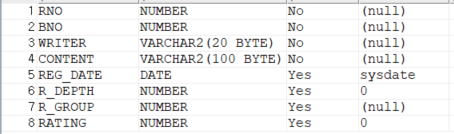
- 기존의 reply 테이블에 'rating' 컬럼을 추가시켜준다!
OracleDB
//별점 평균값
<select id="ratingAvg" resultType="double">
	<![CDATA[
		select avg(rating)
		from b_reply
		where bno = #{bno}
	]]>
</select>

//별점이 추가 될때마다 평균 별점 갱신
<update id="updateRating">
	<![CDATA[
		update b_reply
		set rating = #{rating}
		where bno = #{bno}
	]]>
</update>- 댓글 저장부분에도 컬럼 'rating'를 추가 시켜줌.
Controller
mav.addObject("ratingAvg", replyService.ratingAvg(bno));- BoardController 에 추가시켜준다.
- replyService.ratingAvg에 대한 변수명을 jsp에서 쓰기위해 선언함.
Service
	@Override
	public double ratingAvg(int bno) {
		Double ratingAvg = replyDAO.ratingAvg(bno);
		if(ratingAvg == null) {
			ratingAvg = 0.0;
		}

		ratingAvg = (double)(Math.round(ratingAvg*10));
		ratingAvg = ratingAvg/10;
		return ratingAvg;
}- double 타입으로 ratingAvg 변수 선언 후 값을 집어 넣었으며, 별점 작성을 하지않으면 0.0 값이 들어가게 했습니다.
- 여러명의 별점을 계산할 때 소수점 첫째짜리 까지 보이게 하기 위해 math.round()함수를 사용했다.
ReplyVO reply = new ReplyVO();
		reply.setBno(reply.getBno());
		reply.setRating(reply.getRating());
replyDAO.updateRating(reply);- Service 삭제 부분에 코드를 추가시켰다. 그래서 삭제가 되면 별점이 자동으로 업데이트 되게 하였습니다.
DAO
	//별점 평균값
    @Override
	public Double ratingAvg(int bno) {
		return session.selectOne("mapper.reply.ratingAvg",bno);
	}

    //별점 평균값 갱신
	@Override
	public void updateRating(ReplyVO reply) {
		session.update("mapper.reply.updateRating",reply);
	}
jsp
//평균 별점이 나오는 부분
    <div>
		<span class="star"> ★★★★★ <span
			style="width:calc(18.9%*${ratingAvg })">★★★★★</span></span>
		<fmt:formatNumber value="${ratingAvg }" pattern="0.0" />
	</div>

 //댓글 작성시 별점 체크하는 부분
 			<div class="star-ratings space-x-4 mx-auto" id="rating">
				<!-- 평점 -->
				<input type="radio"  id="5-star" name="rating" value="5" />
				<label for="5-star" class="star">★</label>

				<input type="radio"  id="4-star" name="rating" value="4" />
				<label for="4-star" class="star">★</label>

				<input type="radio"  id="3-star" name="rating" value="3" />
				<label for="3-star" class="star">★</label>

				<input  type="radio" id="2-star" name="rating" value="2" />
				<label for="2-star" class="star">★</label>

				<input  type="radio" id="1-star" name="rating" value="1" />
				<label for="1-star" class="star">★</label>
</div>- html body 부분에 알맞게 추가시키면 된다. 그러면 이러한 화면이 나오게 된다
CSS
<style>
/* 평균 별점 및 사용자가 제출한 별점 css  */
.star {
    position: relative;
    font-size: 2rem;
    color: #ddd;
}
.star span {
    width: 0;
    position: absolute;
    left: 0;
    color: gold;
    overflow: hidden;
    pointer-events: none;
}
/* 작성 시 별점 드래그 선택 css  */
.star-ratings {
    display: flex;
    flex-direction: row-reverse;
    font-size: 2.25rem;
    line-height: 2.5rem;
    justify-content: space-around;
    padding: 0 0.2em;
    text-align: center;
    width: 5em;
  }

  .star-ratings input {
    display: none;
  }

  .star-ratings label {
    -webkit-text-fill-color: transparent; /* Will override color (regardless of order) */
    -webkit-text-stroke-width: 2.3px;
    -webkit-text-stroke-color: #2b2a29;
    cursor: pointer;
  }

  .star-ratings :checked ~ label {
    -webkit-text-fill-color: gold;
  }

  .star-ratings label:hover,
  .star-ratings label:hover ~ label {
    -webkit-text-fill-color: #fff58c;
  }


</style>
Js
var rating = $('input:radio[name=rating]:checked').val();- getReplyList() 부분에 변수를 선언 시켜주었다.
- 사용자가 제출한 별점을 나오게 하기위해서 줌,
- 댓글 저장 부분 스크립트 에도 추가해주었다.
//댓글 리스트 부분 추가
htmls += '<br>'
htmls += '<span class="star"> ★★★★★ <span style="width:calc(18.9%*' +rating + ')">★★★★★</span></span>'
htmls += '<br>'- calc() CSS함수를 사용하여서 사용자가 평가한 별점을 표시하게 하였습니다.
- json 부분에 댓글 list쪽 댓글 부분에 추가 해주었다.
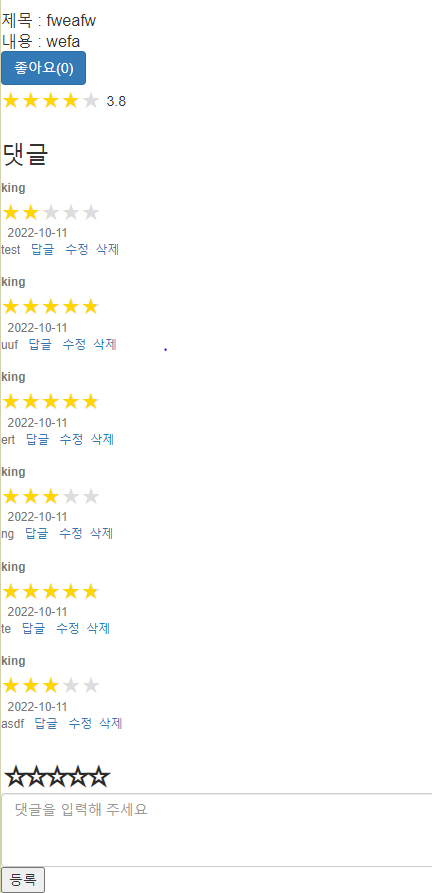
- 보이는 화면처럼 출력이 되는 것을 확일 할 수 있습니다.
'Spring > Study' 카테고리의 다른 글
| [Spring] 세션 유지 시간 만료 시 경고창 띄우기 (0) | 2023.03.19 |
|---|---|
| [Spring]장바구니 기능 구현 (0) | 2022.11.21 |
| [Spring]게시판 상단 고정 공지사항 구현 (0) | 2022.10.04 |
| [Spring]Ajax를 이용한 좋아요 기능 구현 (0) | 2022.09.25 |
| [Spring]Ajax를 이용한 댓글(답글) 구현 (0) | 2022.09.25 |